Model Downloads
The Downloads page at /ui/models/files/pull/ is where you fetch GGUF files from HuggingFace into the shared local cache that Bodhi reads from. Downloads run in the background, survive page reloads, and update progress in real time so you can keep working while large files transfer.
If you have not yet decided whether you need a local file or a remote provider, see Models, Aliases, and Files.
How it works
You give Bodhi a HuggingFace repository ID and a filename. Bodhi creates a download request, kicks off the transfer in the background, and persists progress so you can navigate away (or close the browser) without losing it.
Submitting a request:
- Open
/ui/models/files/pull/. - Enter the repository (e.g.
TheBloke/Mistral-7B-Instruct-v0.1-GGUF) and filename (e.g.mistral-7b-instruct-v0.1.Q8_0.gguf). - Submit. If the same repo/filename/snapshot is already in flight or already downloaded, Bodhi returns the existing record instead of duplicating work.
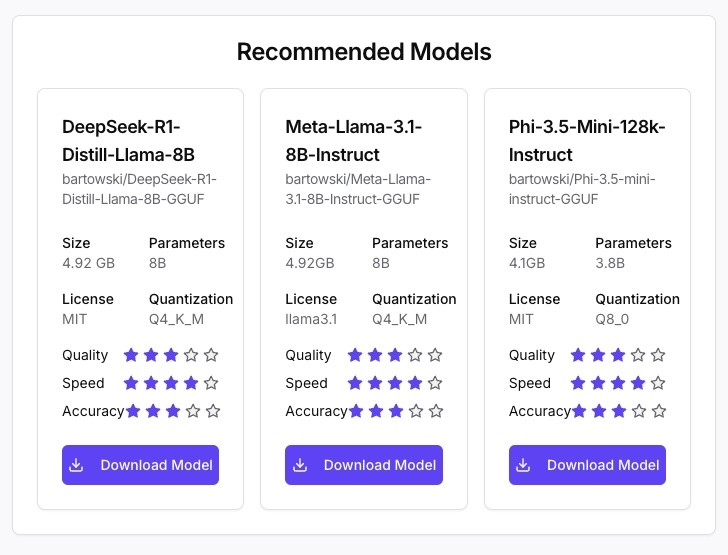
Setup wizard: during first-run setup the same flow appears as the Download Models step, with a curated list of recommended chat and embedding models so you can get to a working chat without copy-pasting repo names.
Status types
Each download row shows one of:
- Pending — queued, will start shortly.
- In Progress — actively transferring. Row expands to show the progress bar, bytes transferred / total, percentage, and (when reported by HuggingFace's library) speed and ETA.
- Completed — file is on disk; the auto-generated model alias is ready to use.
- Error — expand the row for the underlying message.
The page polls the server while any download is in progress and stops polling once everything is settled, so an idle Downloads page is cheap.
Background behaviour
- Navigate freely — leaving the page does not pause the download.
- Close the browser — the server keeps pulling.
- Multiple downloads — run in parallel, no manual queueing required.
- Resume on restart — if Bodhi restarts mid-download, in-flight transfers resume on the next launch via the HuggingFace library's caching behaviour.
Common errors
- File already exists — the requested repo/filename/snapshot is already cached. Look on the Model Files page; it is ready to use.
- Network error — no connectivity to HuggingFace. Retry once the network is back.
- Repository or file not found — typo in the repo or filename. Check the model card on HuggingFace for the exact strings (filenames are case-sensitive and quantization-specific).
- Auth required — some HuggingFace repos are gated. Configure a HuggingFace token in App Settings and retry.
For unresolved errors, see Troubleshooting.
After a download completes
- The file shows up on the Model Files page.
- Bodhi auto-creates a Model File Alias named
{repo}:{quantization}(for exampleQuantFactory/Meta-Llama-3-8B-Instruct-GGUF:Q8_0). Use this directly from chat, or copy it into a User Defined Alias if you want to override parameters — see Model Aliases. - The chat picker refreshes; the new model is selectable immediately.
Where to go next
- Configure inference parameters and chat templates — Model Aliases.
- Manage cached files (preview, delete) — Model Files.
- Prefer a hosted provider instead? — API Models.