App Settings
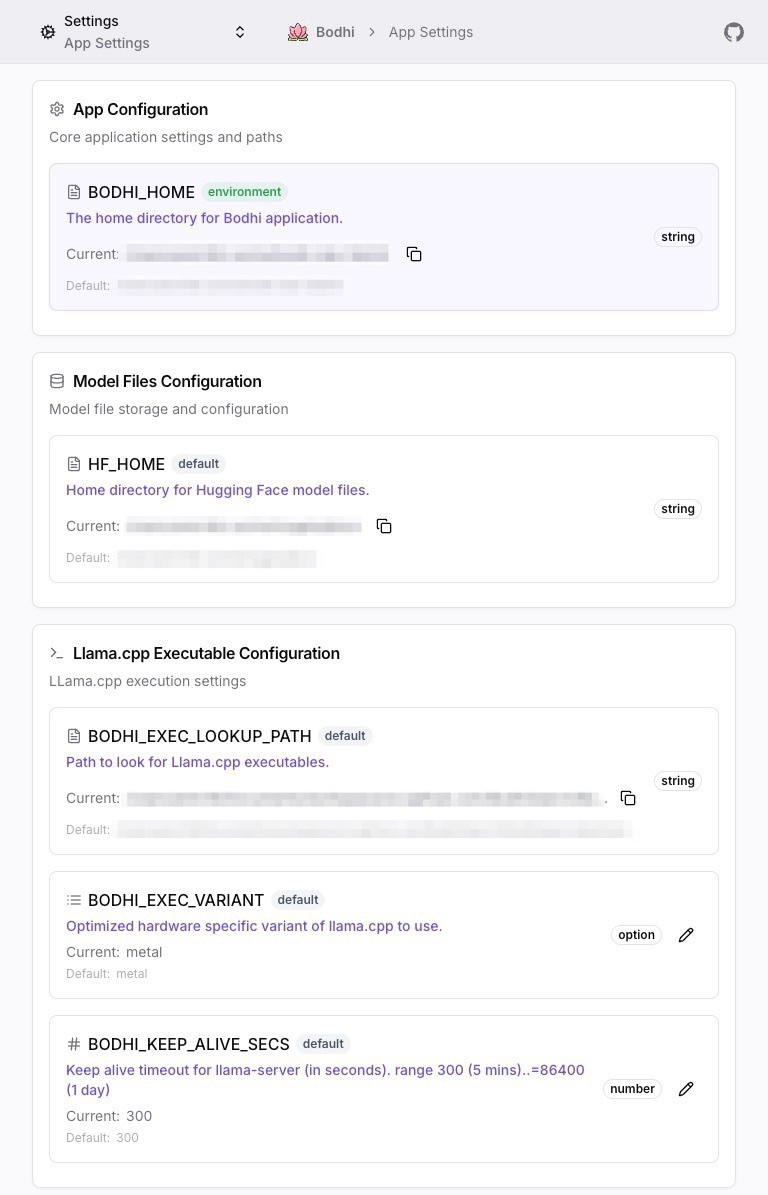
The Settings page is a transparency tool. It shows you every runtime configuration value Bodhi is using, where each value came from (env var, config file, database, default, etc.), and lets you edit a small, deliberately conservative subset directly from the UI.
Required role: Admin.
URL: /ui/settings/
What's editable from the UI
Only two settings can be modified through the Settings page:
| Setting | What it controls |
|---|---|
BODHI_EXEC_VARIANT |
Which optimized llama.cpp build to use for local inference (CPU / Metal / CUDA / etc.) |
BODHI_KEEP_ALIVE_SECS |
How long an idle llama.cpp model stays loaded before being unloaded |
Everything else on the page is read-only. To change anything else, you set the appropriate environment variable, edit the YAML config file, or pass a CLI flag at startup.
This deliberately small editable surface keeps Bodhi's runtime configuration auditable: the UI cannot mutate auth URLs, listen ports, log levels, or storage paths out from under operators who may have set them in infrastructure-as-code.
The full list of recognized environment variables and their defaults will live at
/docs/reference/env-vars(reserved — lands in the reference tier).
Source badges and precedence
Each row on the Settings page shows a source badge — where the current value came from. There are six possible sources, applied in priority order (highest wins):
- System — built-in immutable values; cannot be overridden.
- CommandLine (CLI) — flags passed at startup.
- Environment (Env) — environment variables.
- Database — values written through this UI.
- SettingsFile (File) — the YAML config file in
$BODHI_HOME. - Default — fallback used when nothing else is set.
If you set BODHI_KEEP_ALIVE_SECS=600 as an environment variable and then try to "edit" it through the UI, the saved value lands in the Database source — but the Environment source still wins, so the displayed effective value won't change. The UI is honest about this: the badge tells you which source is actually being used.
Detailed precedence rules and the editable-subset contract will be documented at
/docs/reference/env-varsand the reserved/docs/reference/settingspage (Phase 4).
What the page shows
For each setting:
- Key — the canonical name (e.g.
BODHI_EXEC_VARIANT). - Current value — what's actually in effect at the time the page loaded.
- Default value — what would be used if nothing was overriding it.
- Source — color-coded badge indicating the origin (System / CLI / Env / Database / File / Default).
- Edit button — present only on the two editable keys.
Settings are grouped into cards by category: paths, server, public access, logging, build info, auth, and runtime/llama.cpp. The categorization is informational only — there's no per-category edit gate.
Editing a setting
- Open
/ui/settings/. - Find the row you want to change. Edit buttons only appear on
BODHI_EXEC_VARIANTandBODHI_KEEP_ALIVE_SECS. - Click Edit to open the dialog.
- Provide a new value:
- Execution Variant — pick from the list of variants compiled into your build (e.g.
cpu,metal,cuda,vulkan). - Idle Timeout — a positive integer in seconds.
- Execution Variant — pick from the list of variants compiled into your build (e.g.
- Click Save.
The change is validated, persisted to the SQLite database, and applied immediately. No restart. The source badge for that row updates to reflect the new origin (Database, unless a higher-priority source still overrides).
If you save a value but the higher-priority source is still in effect, the displayed effective value won't change — that's expected. To take effect, either remove the higher-priority override or live with the override winning.
Why so little is editable
Bodhi treats configuration as deployment-time concern, not runtime concern. Things like:
- Where to listen (
BODHI_HOST,BODHI_PORT) - Which OAuth provider to use
- Where data is stored
- How verbose logs are
- Whether you're in dev or production
…are properties of the deployment, not the application state. Letting an Admin change them through the UI would create config drift between containers in a fleet, between the running process and its restart command, and between the database and the YAML file your CI pipeline ships.
The two settings that are editable (variant, keep-alive) are runtime tuning knobs — they affect behavior of the local inference subsystem and are reasonable to tweak without redeploying.
Operator tips
- Read the badges first. If a setting isn't behaving as expected, the source badge tells you whether the env var, file, or database value is winning.
- Variant changes are instant but require a model reload. If you switch from
cputometal, the next inference call will load the model under the new variant. - Keep-alive trades latency for memory. A long keep-alive keeps models hot (faster subsequent calls) but holds RAM/VRAM. A short keep-alive frees memory but reloads on each call.
See also
- Auth Overview — only Admins can view or edit settings
- Docker Deployment — environment variable patterns for containerized deployments
/docs/reference/env-vars(reserved) — complete environment variable reference/docs/reference/settings(reserved) — full precedence rules and editable-subset contract/docs/advanced/inference-stack(reserved) — whatBODHI_EXEC_VARIANTactually selects under the hood