API Models
An API model lets Bodhi proxy chat (and embedding) requests to a third-party provider while your local API surface, auth, and audit trail stay the same. You configure the provider once; clients keep calling Bodhi's familiar endpoints; Bodhi forwards to the upstream and rewrites headers so you don't have to swap SDK base URLs per provider.
If the difference between an alias and an API model is fuzzy, read Models, Aliases, and Files first.
Supported provider formats
Bodhi has five first-class provider formats. Pick the one whose protocol matches the upstream service.
| Format | Auth | Bodhi proxy endpoints |
|---|---|---|
| OpenAI | API key (Bearer) | /v1/chat/completions, /v1/embeddings, /v1/models |
| OpenAI Responses | API key (Bearer) | /v1/responses (full CRUD), pure pass-through |
| Anthropic | API key (x-api-key or Bearer) |
/anthropic/v1/messages, /v1/messages, /anthropic/v1/models |
| Anthropic OAuth | OAuth Bearer token | Same as Anthropic — see Anthropic OAuth |
| Gemini | API key (x-goog-api-key or Bearer) |
/v1beta/models/{model}:{action}, /v1beta/models |
Other OpenAI-compatible services (OpenRouter, HuggingFace Inference, Groq, Together AI, vLLM, LM Studio, Ollama, your own gateway, etc.) all use the OpenAI format with their custom Base URL. There is no separate "Groq" or "Together" provider type — the OpenAI wire format is the bridge. Set the base URL appropriately and you are done.
Provider quick reference
| Provider | Format | Base URL | API key source |
|---|---|---|---|
| OpenAI | OpenAI | https://api.openai.com/v1 |
platform.openai.com |
| OpenAI (Responses API) | OpenAI Responses | https://api.openai.com/v1 |
platform.openai.com |
| Anthropic | Anthropic | https://api.anthropic.com/v1 |
console.anthropic.com |
| Anthropic via OAuth | Anthropic OAuth | https://api.anthropic.com/v1 |
obtained via Claude Code (see Anthropic OAuth) |
| Google Gemini | Gemini | https://generativelanguage.googleapis.com/v1beta |
aistudio.google.com |
| OpenRouter | OpenAI | https://openrouter.ai/api/v1 |
OpenRouter dashboard |
| HuggingFace Inference | OpenAI | https://router.huggingface.co/v1 |
HuggingFace settings |
| Custom OpenAI-compatible | OpenAI | provider-specific | provider-specific |
Creating an API model
Open /ui/models/api/new/ (or "New API Model" on the Models page).
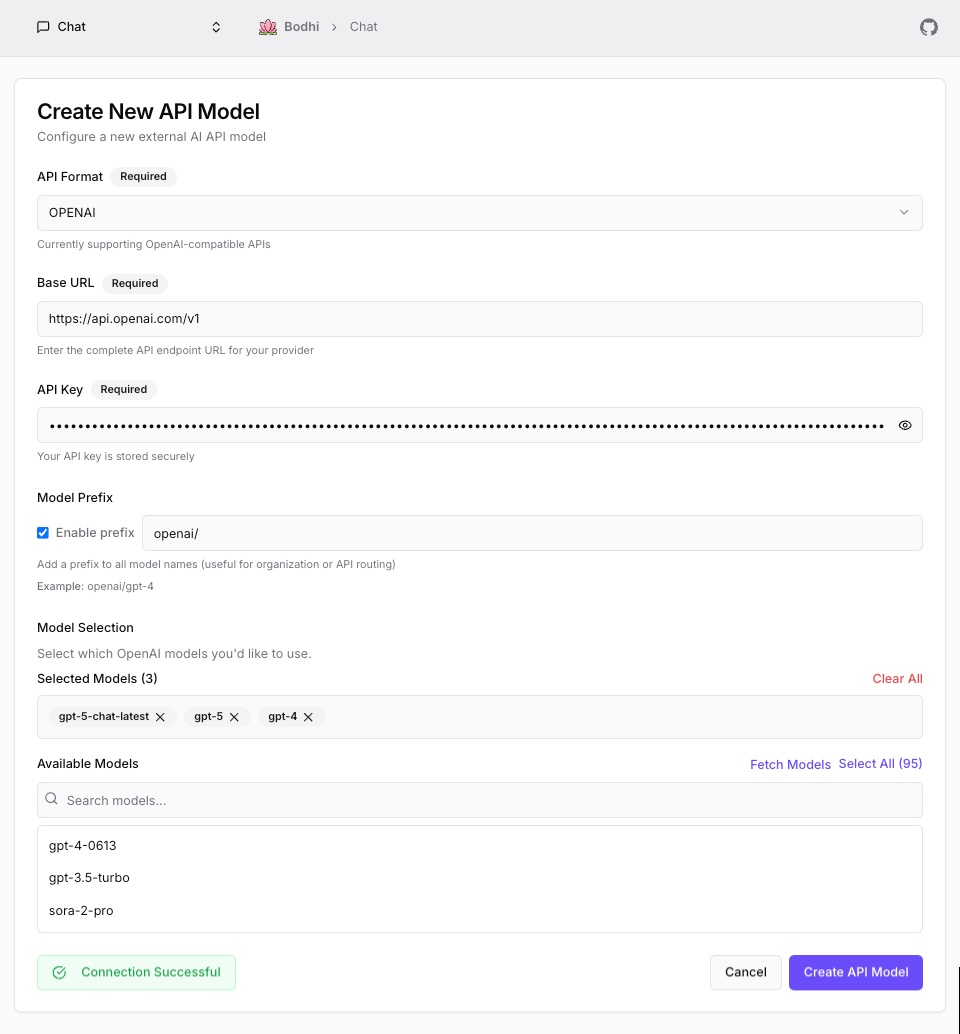
1. Pick the API Format
The dropdown lists the five formats from the table above. Picking a format auto-fills the Base URL with the canonical endpoint and (for Anthropic OAuth) pre-populates Extra Headers and Extra Body with the values that flow expects.
2. Set the Base URL
For OpenAI, Anthropic, and Gemini, leave the auto-filled URL alone. For OpenRouter, HuggingFace, or any other OpenAI-compatible service, replace it with the provider's base URL. Bodhi appends the per-format suffix (/chat/completions, /messages, :generateContent, etc.) when forwarding.
3. API key (or no key)
Toggle Use API Key on, paste the key into the masked field, and Bodhi encrypts it (AES-GCM) before storing in the database. You can change or remove the key at any time by editing the API model.
Some self-hosted endpoints accept anonymous requests; in that case toggle Use API Key off and Bodhi forwards without an Authorization header.
For Anthropic OAuth, the "API key" field accepts the OAuth Bearer token (it begins with sk-ant-oat01-). See Anthropic OAuth for how to obtain one.
4. Extra Headers and Extra Body (advanced)
Both fields take a JSON object and apply on every request forwarded upstream:
- Extra Headers are merged into the outbound HTTP headers.
- Extra Body is deep-merged into the outbound JSON body.
// Extra Headers
{
  "anthropic-version": "2023-06-01",
  "anthropic-beta": "claude-code-20250219,oauth-2025-04-20"
}
// Extra Body
{
  "max_tokens": 4096
}
Authorization-related header names (authorization, x-api-key, x-goog-api-key) are rejected here — use the API key field. Both fields must be valid JSON objects (not arrays or primitives) and are optional.
When you select Anthropic OAuth, Bodhi pre-fills sensible defaults for these fields. Tweak only if you know what you are changing.
5. Prefix routing (optional)
A prefix namespaces the provider's models. Without a prefix, requests with model: gpt-4o route to whichever OpenAI-format provider claims that ID. With prefix oai/, callers must say model: oai/gpt-4o and Bodhi strips the prefix before forwarding.
Use prefixes when:
- You configured two providers that expose overlapping model IDs (OpenAI direct and OpenRouter, for example).
- You want clear provenance in client requests.
Skip prefixes when you only have one provider per format. Each prefix must be unique across all API models. Allowed: alphanumerics plus a small set of symbols, no spaces, max 32 characters.
Forward All with Prefix
When a prefix is set, you can flip on Forward All with Prefix instead of selecting individual models. Any incoming request with a model ID starting with the prefix is forwarded; the prefix is stripped before the upstream call. This is the way to use OpenRouter (or any aggregator) without curating a model list by hand.
6. Fetch Available Models
Click Fetch Models and Bodhi calls the provider's catalog endpoint (/models, or the format-specific equivalent) to retrieve everything the upstream offers. Pick the ones you want exposed for chat — up to 50 per API model.
If fetch fails, double-check the API key and base URL. The error message reports what the upstream returned.
7. Test Connection
Test Connection sends a small format-appropriate request (a one-token chat completion or its equivalent for non-chat formats) using the form's current values. It validates the API key, the base URL, any Extra Headers, and any Extra Body in one round-trip — catching mistakes before you save.
For an existing API model, the test uses the stored API key.
8. Save
Save and the configuration is written to the database (key encrypted), the page redirects to the Models index, and your new entries become selectable in chat immediately.
Using API models in chat
API models appear in the Models page alongside local aliases (Source badge: API) and in the chat model picker.
- Open
/ui/chat/. - In the right-hand Settings panel, expand Model and pick the API model. Models are grouped by provider and (if configured) carry their prefix.
- Chat as usual — Bodhi forwards each request to the provider, streams the response back, and applies the alias's defaults along the way.
The Models page row's Action column shows the top three exposed models from each API entry; clicking one jumps straight to chat with it preselected.
Editing and deleting
Edit at /ui/models/api/edit/... (or via the row action). All fields are mutable: base URL, API key, prefix, Forward-All toggle, the model selection list, Extra Headers, and Extra Body. The API key field shows a placeholder until you type a new value (so leaving it untouched preserves the stored key).
Delete removes the configuration and the encrypted key. Existing chats that referenced the API model are preserved but cannot be continued — pick a different model, or recreate the API entry.
Authentication forwarded to upstream
Bodhi accepts client credentials in any of the conventional shapes for each format and rewrites them to whatever the upstream expects:
- OpenAI / OpenAI Responses:
Authorization: Bearer <key>. - Anthropic: clients may send
x-api-keyorAuthorization: Bearer; Bodhi forwards asx-api-key. Headers prefixed withanthropic-(versioning, beta flags) pass through verbatim. - Anthropic OAuth: forwarded as
Authorization: Bearer <oauth-token>. The format also injects the headers and body fields Anthropic OAuth requires (see Anthropic OAuth). - Gemini: clients may send
x-goog-api-keyorAuthorization: Bearer; Bodhi forwards asx-goog-api-key. SDK telemetry headers (x-goog-*) pass through unchanged. Query parameters such as?alt=sseare preserved for streaming.
Curl quick checks
# OpenAI format through Bodhi
curl http://localhost:1135/v1/chat/completions \
  -H "Authorization: Bearer <bodhi-api-token>" \
  -H "Content-Type: application/json" \
  -d '{"model":"gpt-4o","messages":[{"role":"user","content":"Hello"}]}'
# Anthropic format through Bodhi
curl http://localhost:1135/anthropic/v1/messages \
  -H "x-api-key: <bodhi-api-token>" \
  -H "anthropic-version: 2023-06-01" \
  -H "Content-Type: application/json" \
  -d '{"model":"<your-anthropic-model>","max_tokens":1024,"messages":[{"role":"user","content":"Hello"}]}'
# Gemini format through Bodhi
curl "http://localhost:1135/v1beta/models/<your-gemini-model>:generateContent" \
  -H "x-goog-api-key: <bodhi-api-token>" \
  -H "Content-Type: application/json" \
  -d '{"contents":[{"parts":[{"text":"Hello"}]}]}'
<bodhi-api-token> is a Bodhi API token (see API Tokens), not your provider's key — Bodhi attaches the upstream key on its own.
Troubleshooting
Test Connection fails
- "Invalid API key" — copy the key again, watch for trailing whitespace.
- "Network error" — no path to the provider; check connectivity, proxy, and any corporate firewall.
- "Connection failed" — base URL is wrong or unreachable.
- "Rate limit exceeded" — wait and retry.
Fetch Models fails — the API key and base URL together don't reach the catalog endpoint. Re-test the connection first; once that passes, fetch should too.
Model doesn't appear in chat — confirm the model was selected (or that Forward All with Prefix is on); refresh the Models page.
Chat returns an error against an API model — the upstream rejected the call. Check the provider's quota and account status.
For more, see Troubleshooting.
Security notes
- API keys are encrypted at rest with AES-GCM.
- Keys are never displayed after creation; the form shows a placeholder until you type a replacement.
- Bodhi does not rotate keys for you — when you rotate at the provider, edit the API model and paste the new key.
- Only PowerUser-and-above roles can create or modify API models. See Auth Overview.
Where to go next
- Using a Claude.ai or Anthropic Console account without an API key? Anthropic OAuth.
- Driving Bodhi from your own application? Building Apps.
- Want to programmatic access without a session? API Tokens.