Model Files
The Model Files page at /ui/models/files/ shows every GGUF that lives in your local HuggingFace cache — the actual weight files Bodhi reads when it runs llama.cpp. Files and aliases are independent: deleting a file doesn't remove the aliases pointing at it, and deleting an alias doesn't free disk space. This page is the place to manage the file side.
If you want to download a new GGUF, head to Model Downloads. For configuring a remote provider, see API Models.
What you see
For each cached file the table shows:
- Repository — the HuggingFace source (e.g.
QuantFactory/Meta-Llama-3-8B-Instruct-GGUF). - Filename — the GGUF file, including the quantization suffix (
Q4_K_M,Q8_0, etc.). - Size — disk space used. GGUFs typically range from a few hundred MB up to tens of GB.
- Updated At — the cache timestamp.
- Snapshot — the snapshot ID from HuggingFace (lets you tell two versions of the same filename apart).
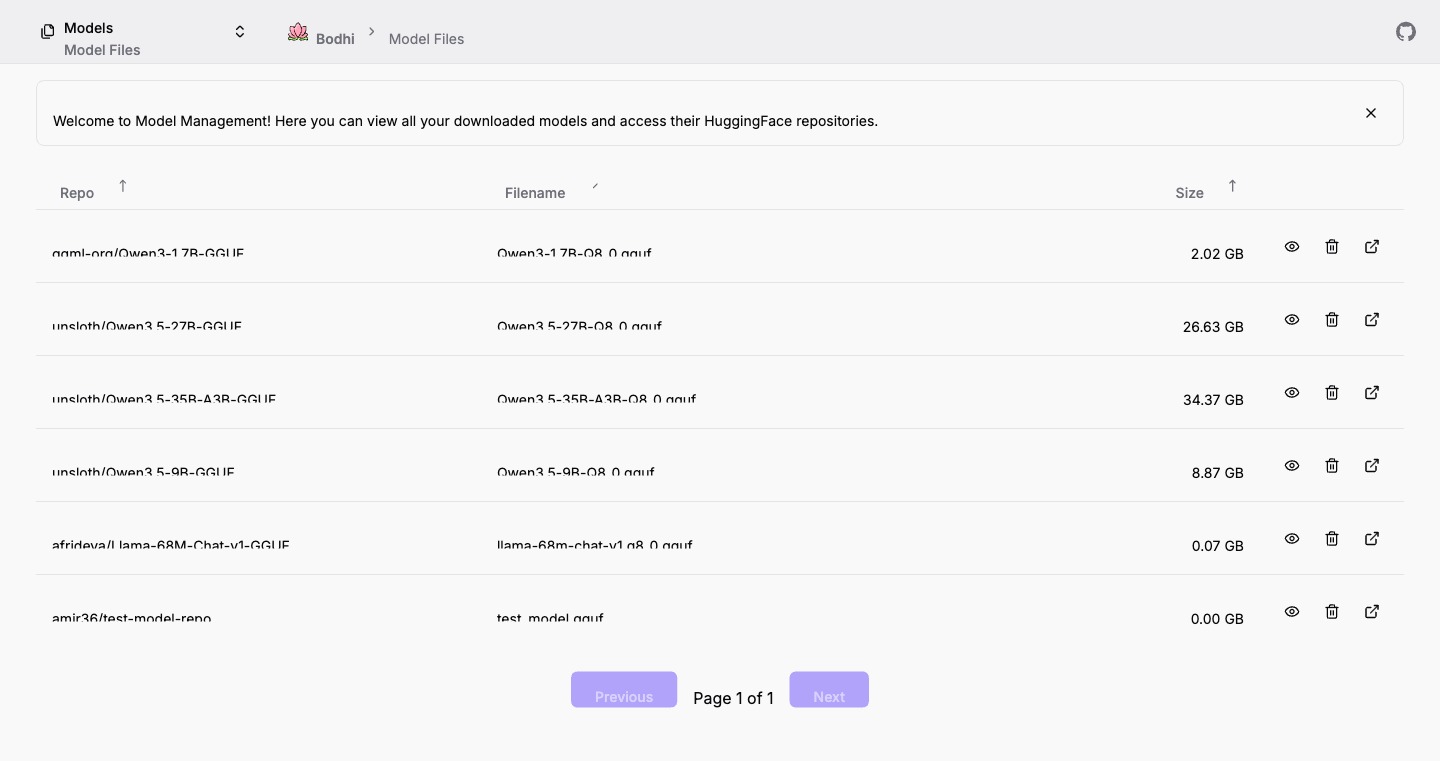
Per-row actions
- Open in HuggingFace — opens the source repository in a new tab. Useful for checking model cards, license terms, and alternative quantizations.
- Preview — modal showing the metadata Bodhi extracted from the GGUF headers: capabilities (vision, audio, thinking, function calling, structured output), context window limits, architecture family, parameter count, and quantization level.
- Delete — removes the file from local disk. Aliases still pointing at the file will fail the next time they try to launch llama.cpp.
Where the files live
Bodhi does not host its own model cache. GGUFs are stored under the standard HuggingFace cache directory (~/.cache/huggingface/hub/... on macOS and Linux, the platform-equivalent path on Windows). That means:
- Other tools that respect the HF cache (
llama.cppCLI,ollama, LM Studio, etc.) can use the same files. No duplication. - Files persist across Bodhi reinstalls.
- On Docker, mount the cache directory into the container if you want downloads to survive container recreates.
GGUF in one paragraph
GGUF is the binary format llama.cpp uses for quantized weights. Each file embeds the chat template, tokenizer, architecture descriptor, and capability flags alongside the weights, so Bodhi can read the metadata without parsing every model's config separately. Quantization levels (Q4, Q5, Q8 and so on) trade quality for size — see the model card on HuggingFace to pick the right one for your hardware. Bodhi does not currently support non-GGUF local formats; for anything else, configure an API Model pointing at a hosted endpoint.
Cleaning up
A few patterns we see often:
- Removing an unused quantization — if you grabbed both Q4_K_M and Q8_0 to compare, delete the one you don't keep using.
- Verifying a flaky download — open the Preview modal; if the metadata looks malformed, delete and re-download from the Model Downloads page.
- Auditing storage — sort by Size to find the heaviest files. Llama-3-70B and similar large models occupy 30+ GB at higher quantization levels.
Where to go next
- Need a model that isn't here yet? Head to Model Downloads.
- Want to wrap a file in your own configuration (custom temperature, stop sequences, server flags)? Create a User Defined Alias — see Model Aliases.