Model Aliases
A model alias is the named recipe Bodhi uses to launch llama.cpp: which GGUF file to load, which chat template to apply, what default request parameters to use, and which command-line flags to pass to the inference server. Aliases are what you type into a chat client's model field — local files alone aren't usable until an alias points at them.
If the difference between a file, an alias, and an API model is fuzzy, read Models, Aliases, and Files first.
The Models page
The Models page at /ui/models/ lists everything Bodhi can answer with — local aliases and remote API models — in one sortable table.
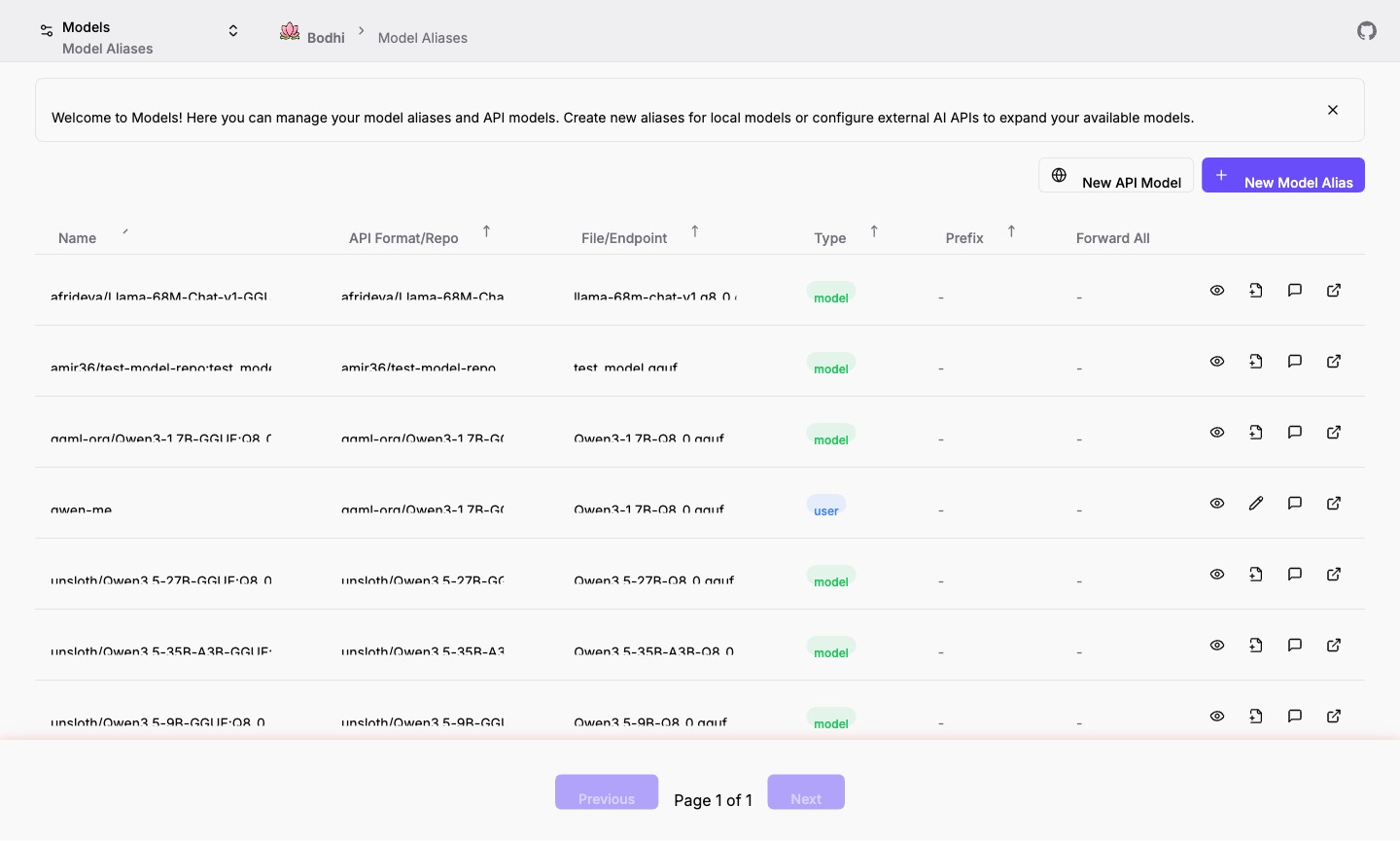
Source badges tell you which kind of entry each row is:
- user — a User Defined Alias you (or another admin) created.
- model — an alias auto-generated from a downloaded GGUF file. Read-only.
- API — a remote API model. See API Models.
Per-row actions: Chat (jump straight to the chat UI with this model selected), Edit, Preview (capabilities, context window, architecture pulled from GGUF headers), Refresh metadata, New from Model (create a User alias pre-filled with this row's repo and filename), and an external link to the HuggingFace repo or provider URL. Hover over column values to copy them.
Two flavors of local alias
User Defined Alias
A YAML record under $BODHI_HOME/aliases/. You control the alias name, request parameters, and llama.cpp flags. Editable, renameable, deletable.
Model File Alias
When you download a GGUF, Bodhi auto-creates a read-only alias named {repo}:{quantization} (for example, QuantFactory/Meta-Llama-3-8B-Instruct-GGUF:Q8_0). Capabilities, context size, and other metadata come from the embedded GGUF headers. Use this when you just want to chat without configuring anything; copy it to a User Defined Alias if you need to override parameters.
Sample alias YAML
alias: llama3:instruct
repo: QuantFactory/Meta-Llama-3-8B-Instruct-GGUF
filename: Meta-Llama-3-8B-Instruct.Q8_0.gguf
snapshot: 5007652f7a641fe7170e0bad4f63839419bd9213
context_params:
  - '--ctx-size 2048'
  - '--threads 4'
  - '--parallel 1'
  - '--n-predict 4096'
  - '--n-keep 24'
request_params:
  temperature: 0.7
  frequency_penalty: 0.8
  stop:
    - <|start_header_id|>
    - <|end_header_id|>
    - <|eot_id|>
Field reference:
alias(required) — unique name for this configuration; this is the value clients put in themodelfield.repo(required) — HuggingFace repository ID.filename(required) — the specific GGUF file in the repo.snapshot(optional) — pin to a commit hash. Leave empty for the latest snapshot.context_params(optional) — array of llama-server flags applied at process startup. One flag per array entry.request_params(optional) — defaults applied to every request that does not override them:temperature,top_p,frequency_penalty,presence_penalty,max_tokens,seed, and up to fourstopsequences.
For the full set of llama-server CLI flags, see the llama.cpp server documentation. Server-wide defaults that apply across aliases live under App Settings.
Creating or editing an alias
Open the form at /ui/models/alias/new/ (or click "Edit" on a row in the Models page). You can also click "New from Model" on a model-file alias to pre-fill the form with that file's repo and filename.
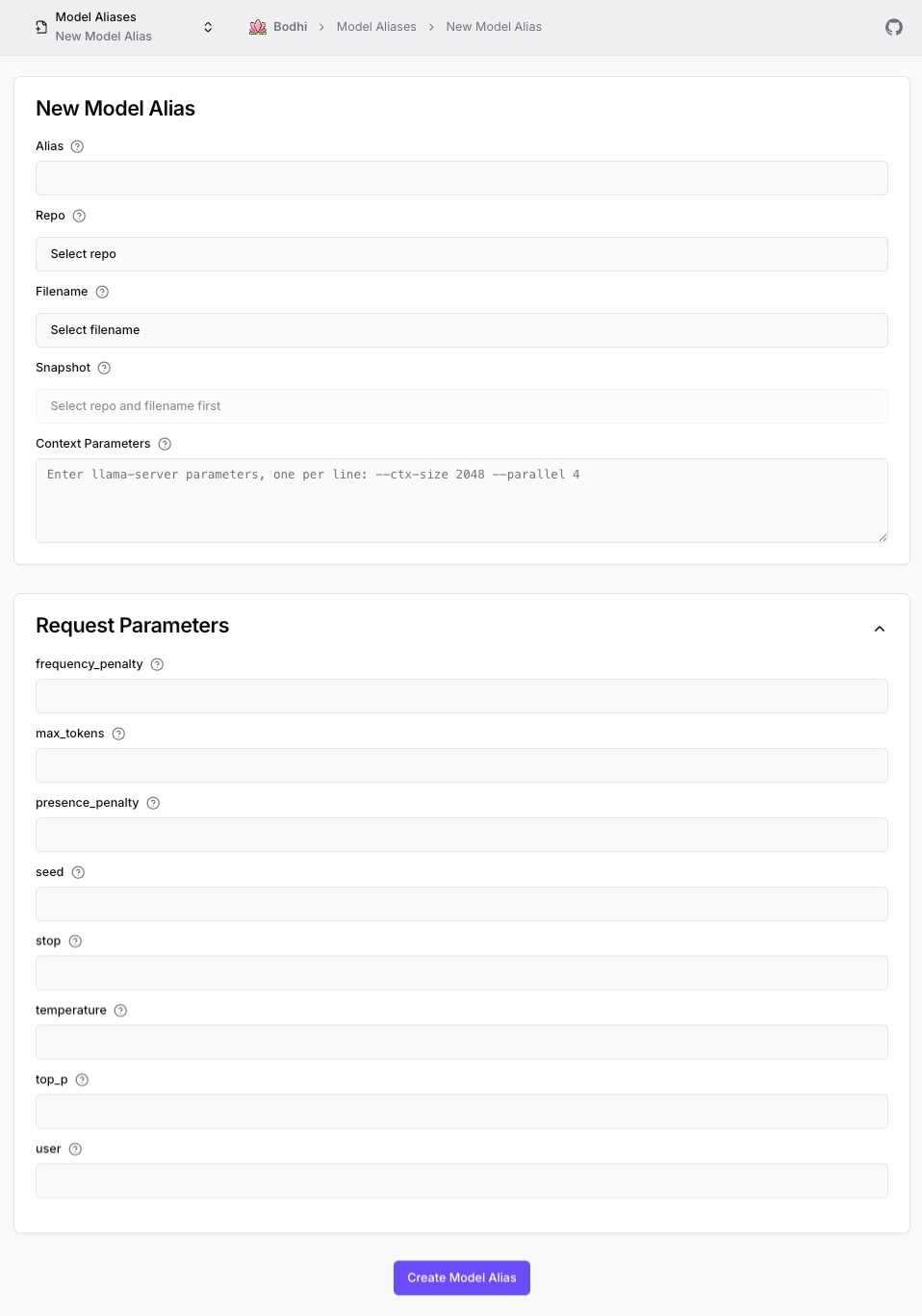
Form fields:
- Alias — unique identifier. Must not collide with any other alias or API-model ID.
- Repo / Filename / Snapshot — points at the GGUF file. The file must already be downloaded (see Model Downloads).
- Context Parameters — one llama-server flag per line in
--flag valueform. - Request Parameters — collapsible section for the inference defaults listed above.
Save and the alias appears in the Models page immediately. The next chat or API request that uses the alias name launches llama.cpp with the configured flags (or reuses the running process if it is already up).
How a request flows through an alias
When a request arrives with a model value that matches a User Defined Alias:
- Bodhi launches the llama.cpp server with the alias's
context_paramsif it is not already running for this alias. - The alias's
request_paramsare merged in as defaults — explicit values in the request win. - The request is forwarded to llama.cpp.
- The response (streamed or whole) flows back to the client.
For a Model File Alias, step 1 uses default server flags and step 2 is skipped. Either way, idle llama.cpp processes are torn down after the keep-alive window so resources free up between sessions.
Performance notes
A few rules of thumb that show up repeatedly:
- Threads vs memory — more
--threadscan mean faster inference, but each thread costs RAM. Start at half your CPU core count. - Context size —
--ctx-sizeis a memory and load-time multiplier. 2048 is a safe baseline; raise it only when you actually need longer conversations. - Quantization — Q4_K_M is small but loses some quality; Q8_0 is roughly twice the size with near-full-precision behavior. Test on representative prompts.
- Stop sequences — the right
stoplist prevents wasted generation when the model would otherwise keep producing template tokens.
For deeper tuning advice (variant selection, hardware-specific flags, concurrency), see the upcoming Advanced section.
Common pitfalls
- "My alias points at a file that isn't downloaded." — saving still succeeds; the failure surfaces only when chat tries to launch llama.cpp. Download the file first or remove the alias.
- "Chat says 'model not found' even though I see the alias." — make sure the
modelfield in the request matches the alias name exactly, including any prefix (API models only). - "I want to share aliases across machines." — copy the YAML files in
$BODHI_HOME/aliases/. They are plain text and portable.
Where to go next
- Need to download the file the alias points at? See Model Downloads.
- Cleaning up disk space or auditing local files? See Model Files.
- Configuring a remote provider instead of running locally? See API Models.