API Tokens
API tokens are how programs — CLI scripts, CI jobs, third-party tools, your own backends — authenticate to Bodhi without going through OAuth in a browser. They're database-backed, scope-limited, and revocable from the same UI that issued them.
For the bigger picture (roles vs scopes, token format, when to use a session cookie instead) start at Auth Overview.
Required role to mint tokens: PowerUser or higher.
URL: /ui/tokens/
Token format
bodhiapp_<base64url_random>.<client_id>
- The random portion is 32 cryptographically random bytes, base64url-encoded.
- The
<client_id>suffix scopes the token to a tenant. - The full token is hashed with SHA-256 before storage — only the hash and the first 8 chars (the prefix) are kept. The original is shown exactly once at creation.
You send it as a Bearer token:
curl http://localhost:1135/bodhi/v1/chat/completions \
  -H "Authorization: Bearer bodhiapp_xxxxx.yyyyy" \
  -H "Content-Type: application/json" \
  -d '{
    "model": "<your-model-alias>",
    "messages": [{"role": "user", "content": "Hello"}]
  }'
Token scopes (only two)
API tokens carry one of two scopes:
| Scope | What it can do |
|---|---|
| User | Chat completions, embeddings, list models / aliases. Read-only for resources. |
| PowerUser | Everything User can do, plus download and delete model files. |
That's the whole list. There is no Manager-scope or Admin-scope token. Manager and Admin operations — approving access requests, editing settings, changing roles — are session-only by design. If you need to script those operations, the answer is "you can't, on purpose."
A token's scope is also bounded by the issuing user:
- A User-role human cannot mint any token (they don't have access to the Tokens page).
- A PowerUser human can mint User- or PowerUser-scope tokens.
- An Admin human can mint User- or PowerUser-scope tokens (still no Admin-scope).
Don't confuse this with user roles. "PowerUser" the role is what a logged-in human is. "PowerUser" the scope is what their token can do. The role can do strictly more (it can do all four-role things including Manager/Admin if applicable). See Auth Overview for the side-by-side comparison.
Creating a token
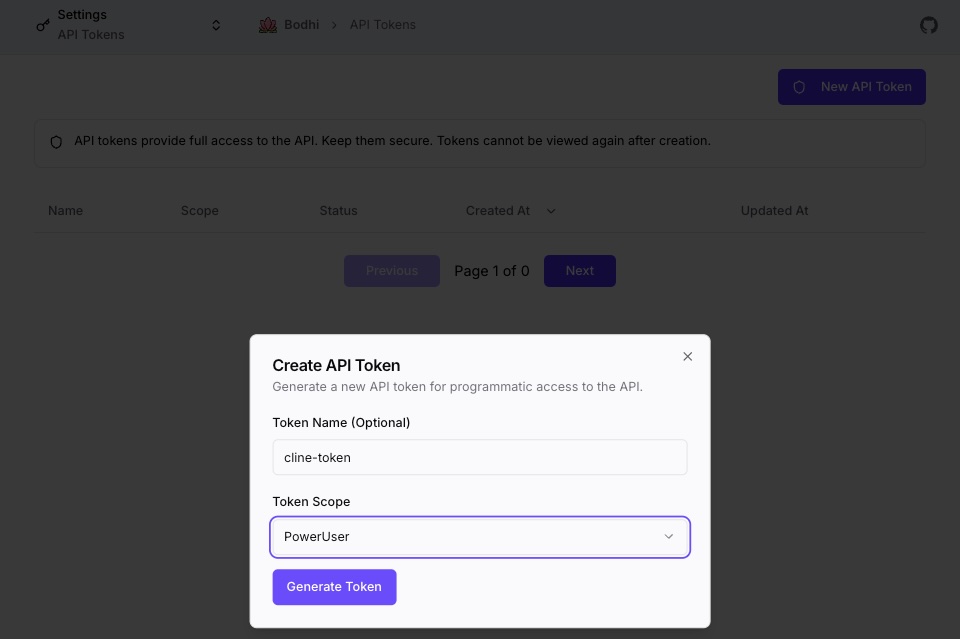
- Open Settings → Tokens (or
/ui/tokens/). - Click New API Token.
- (Optional) Give it a descriptive name like
CI - GitHub ActionsorDev laptop. The name is metadata; it doesn't affect auth. - Pick a scope — User or PowerUser. The scope is immutable after creation. To change scope, mint a new token and deactivate the old one.
- Click Generate Token.
- Copy the token immediately. It's shown exactly once. After you close the dialog, it cannot be recovered — only re-created.
Store the token like a password: a password manager, an environment variable in a .env file (gitignored), or a secret manager (Vault, AWS Secrets Manager, etc.). Do not commit it. Do not log it.
Using a token
Authorization header format:
Authorization: Bearer <token>
That's the only accepted format. Authorization: <token> (missing Bearer ) and Bearer <token> (missing the header name) both fail.
Tokens work against any Bodhi API endpoint that the scope is allowed to call:
- User-scope tokens:
POST /bodhi/v1/chat/completions,POST /bodhi/v1/embeddings,GET /bodhi/v1/models, plus the OpenAI / Anthropic / Gemini compatibility surfaces for the same operations. - PowerUser-scope tokens: all of the above, plus model download and delete endpoints.
For the full per-endpoint scope requirement table, see the embedded API reference (Swagger UI) on your deployed instance.
Managing tokens
The Tokens page lists every token you've created with these columns:
| Column | Notes |
|---|---|
| Name | What you typed at creation |
| Scope | User or PowerUser |
| Status | Active or Inactive (toggle to switch) |
| Created At | Timestamp |
| Updated At | Timestamp of the last status / metadata change |
Token values are never re-displayed. Only metadata is visible after creation.
Activating / deactivating
Flip the Status toggle. An inactive token fails authentication immediately on the next request — useful for temporary disable, rotation, or emergency revocation. Reactivating restores the same token (no value change).
Lifetimes
Tokens do not auto-expire. They live until you deactivate them or until the issuing user is removed (which invalidates all of their tokens). Plan your own rotation cadence based on your security policy.
Rotation
To rotate a token:
- Mint a new token with the same scope.
- Update your application / pipeline to use the new value.
- Confirm the new token works.
- Deactivate the old token from the Tokens page.
Common reasons to rotate: scheduled cadence (quarterly, annually), team member departure, suspected exposure, post-audit cleanup.
Best practices
- Least scope. Use
Userfor chat-only or embedding-only workloads. ReservePowerUserfor pipelines that genuinely need to download or delete models. - One token per integration. Don't reuse the same token across CI, your laptop, and a staging service. Separate tokens make it possible to revoke one without breaking the others.
- Name them. A descriptive name in the Tokens table is the only way to remember what each token is for after a few months.
- Watch for auth failures. Recurring 401/403 from a single token is a signal it was deactivated, the issuing user was removed, or the scope is wrong for the endpoint you're calling.
Troubleshooting
"Invalid authentication token"
The token isn't recognized. Common causes:
- Extra whitespace before or after the token (especially when copy-pasted from a terminal).
- The token was truncated in transit.
- The header is malformed — must be exactly
Authorization: Bearer <token>.
Re-copy from your secret store and retry.
"Inactive token"
The token exists but its Status is Inactive. Toggle it back on, or mint a replacement.
"Unauthorized" / "Insufficient permissions"
The token is valid but its scope doesn't cover the endpoint. Check the Scope column in the Tokens page. If you need higher scope, mint a new token — scopes are immutable.
Token works for chat but not for model download
You have a User-scope token. Model download requires PowerUser scope. Mint a new PowerUser-scope token and update your pipeline.
I lost the token after creation
Tokens are not retrievable. Mint a replacement and deactivate the old one (it's already useless to you, but cleaning it up keeps the table tidy).
My old token still works for a few seconds after I deactivated it
Token validation hits an in-memory cache; revocation is near-instant but not strictly synchronous. A few seconds and it'll fail.
See also
- Auth Overview — roles vs scopes, when to use sessions vs tokens
- Bodhi JS SDK — typed client that handles auth for you
- App Access Management — for third-party apps that need their own scoped credentials